When registering for an account within iTakeControl, all users and participants must accept the iTakeControl Terms of Use and Privacy Policy.
Terms of Use and Privacy Policy
1. Click to begin registration from the invitation email.

2. Create a password and confirm it.

3. Click "Submit"

Alert: Beginning with version 4.2 it will be required for users and participants to scroll and review the terms of use and privacy policy.
4. Review the Privacy Policy and scroll to the bottom.
5. At the bottom click to "Accept" or "Decline".

6. Repeat the process with the Terms of Use.
Tip: Participants who have been invited to a study will be presented with the document in the language they were assigned to when being enrolled.
Declined Documents
7. If either the Terms of Use or Privacy Policy are declined the user or participant will be unable to complete registration and use the system.
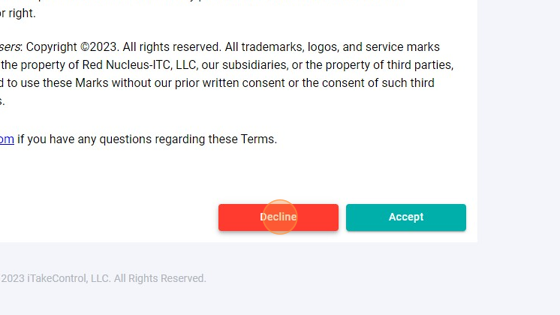
8. Once declined a prompt will confirm the selection.

9. A screen will confirm the documents have been declined and the registration will be cancelled.

Tip: Users and participants can click their invitation link to review the documents again and accept if they accidently declined. A new invitation may also be issued if the link has expired.
10. If any user or participant has any questions or concerns with the Terms of Use or Privacy Policy they can reach out to their study representative or our helpdesk at help@itakecontrolhealth.com.