This guide provides step-by-step instructions on how to complete a Device Kit Request Form for Red Nucleus Clinical. It explains how to navigate to the form, fill out the order details, select the priority and type of request, indicate the items needed, provide shipping details and submit the form. Following this guide will ensure that the request is completed accurately and efficiently.
1. Navigate to the link for the Device Kit Order Form for Red Nucleus Clinical:
https://rednucle.us/rn_clinical_device_order_form
2. Once you are brought to the order form, begin to fill out the Order Details section. Please provide the Study/Project name and Protocol Number, if available.

3. Select the priority of the request from the dropdown menu options as either Low, Normal and High Priority.

Alert: Note: The average time for a Normal Priority Device Request is around 10 - 15 business days to complete.
4. Select the Order Request type from the dropdown menu.

Tip: It is best practice to have your study's Device Configuration Form available when filling out the order form to determine what will need to be ordered. If you are unsure, please reach out to your Red Nucleus Program Lead for assistance.
5. Once every item on this page is filled out, click the "Next" button.

6. You will be brought to the Device Kit Details section. Please indicate which items are needed along with the amount of each item selected.

Alert: "Device Kit" in this form is representative of the recording device (i.e.- a smartphone or other camera) and its charging cables. Indicating the number requested in this field only tells RN Clinical how many Recording Devices are needed. If accessories are needed per your study's Device Configuration, please follow the steps below to indicate that on the order form.
7. If accessories are needed per your study's Device Configuration form, check the box next to each item needed in the list under "Additional Equipment Needed".

8. Once the items are selected, there will be a green check mark in the box next to the item and a new required field for amounts of each item will appear. Input the number of each item that the device user will need.

9. If you do not see a specific item on this list that you need, but it is listed in your study's Device Configuration Form, you can select "Other".

10. When selecting "Other" a free text box will appear where you can input the equipment needed and also the amount of this item.

Tip: An example of this is if a microphone is needed per the study Device Configuration, but it is not on the order form list you can put "Microphone x2" as seen on the completed form below.
11. Once all the relevant information is entered, click the "Next" button.

12. You will be brought to the User/Shipping details section.

13. Select the User Type from the dropdown list.
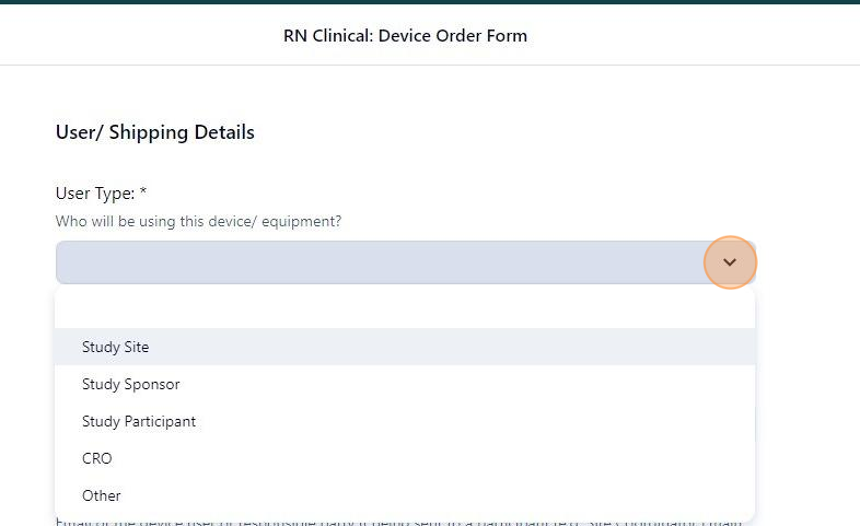
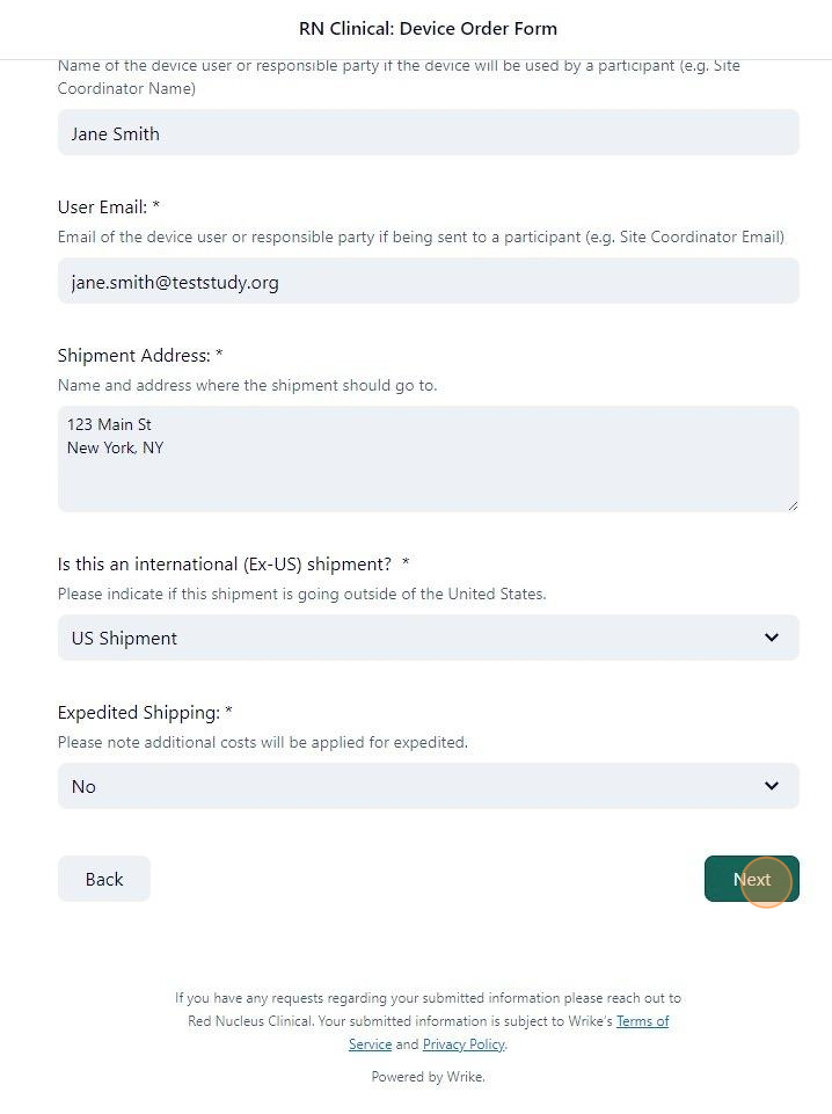
14. Once the user type is selected, fill out the remaining required fields.

15. Under the field shipment address, please include the recipient's Name, Shipping Address, City, Country, Postal Code, and Phone Number (a phone number is required to create a label and necessary for the courier).

Alert: Please ensure all shipping information is correct before completing this form. Inaccurate information can result in a delay in shipment.
16. Once all the shipment information is entered, you will then select whether the shipment will be within the United States (domestic) or if it will be international (outside of the USA).

17. Next you will indicate whether the package will require expedited shipping or not.

18. Once all the required fields are completed, click on the "Next" button.
19. On this page, you will input your information as the requestor. Enter your name and email address in the required fields on this page.

20. The webpage may ask you to verify yourself via reCAPTCHA software. Follow the prompts given and select the checkbox next to "I'm not a robot".

21. Click "Submit".

22. Once the order form has been submitted, you will be brought to a landing page stating that you're done. You will also be receiving an automated email response showing receipt of the order form by Red Nucleus Clinical.

Made with Scribe